Less chart watching. More life.

FOMO is ruining your life.
Get your life back.

One more chart check. One more missed conversation. Another night without sleep. Your trades shouldn’t take over your life. The Akeelah FOMO Manager adds stop-losses, take-profit targets and trailing stops to your FOMO trades. Set your exit plan. Put the phone down. Be there for the moments that matter.

  • Your account, your rules
  • Never holds your funds
  • Telegram & Windows alerts
  • Simulation before LIVE
  • Cancel anytime
Get Your Life Back · 49-second commercial · sound on

How it works with FOMO.family

Built for FOMO on your desktop.
Alerts on your phone.

The FOMO Manager is a desktop Chrome extension for the FOMO web app at fomo.family. You set up your trades and exit plans there, your computer watches them, and your phone gets the alerts.

  • 💻 Set it up on your desktopOpen fomo.family in Chrome. Enter your trade (or pick a position you already hold) and set your stop-loss, take-profit targets and trailing stop.
  • 🌙 Your computer does the watchingYour rules run on that computer while it stays awake with Chrome and FOMO open. No more staring at charts.
  • 🔔 Your phone gets the alertsTelegram and Windows alerts for trade triggers, completed trades and execution problems.
📱 Mostly trade on your phone? We've got you covered.

Take the trade on the FOMO app like always. Then hop on your desktop, open fomo.family, and set the exit plan on that position. From there the Manager watches it and Telegram keeps you posted on your phone.

Exit plans are set on the desktop. A trade opened on your phone isn't managed until you set its plan on your computer.
FOMO · fomo.family
🔒fomo.family/positionFM
EXAMPLEYour position
+112%
Value$1,060
Avg entry$500
BuySell

FOMO web app (illustrative layout)

FOMO ManagerLIVE
Stop loss−30%
TP1 · 2× · 25%Filled ✓
TP2 · 3× · 25%Armed
Trail · 20%Armed
● MONITORING

Interface illustration · not FOMO's actual design · not affiliated with FOMO

FM
Akeelah FOMO Manageralerts · your FOMO account
✅ Take profit 1 filledEXAMPLE · sold 25% at 2.01×1:04 AM
✅ Take profit 2 filledEXAMPLE · sold 25% at 3.02×2:37 AM
📈 Trailing stop triggeredEXAMPLE · exit rule reached4:51 AM
🛑 Stop triggered: bag protectedEXAMPLE A · remaining tokens sold near 2.4×4:52 AM

Illustration · example alerts

Instant alerts

Stay informed.
Stay present.

Follow trade triggers, completed buys and sells, and execution problems with a Telegram message on your phone and a Windows notification on your computer when alerts are enabled.

FMAkeelah FOMO Managernow

Stop triggered: bag protected. EXAMPLE A · remaining tokens sold near 2.4×

  • Fills, stop triggers, scale-outs and execution issues
  • Telegram alerts on your phone
  • Windows notifications on your desktop

Take back your evening.
Start with an exit plan.

Without the FOMO Manager

  • Phone on the pillow, chart open
  • No stop-loss. No take-profit. Just hope.
  • 3 AM: it's up 3× and you're asleep
  • 7 AM: it's below entry
  • You promise yourself "next time I'll sell"

With the FOMO Manager

  • Exit plan armed before bed: stop, 3 targets, trailing stop
  • The Manager monitors your targets while you step away
  • Your stop sets the exit rule for a reversal
  • Telegram tells you what happened
  • Review the fills and errors in your Activity Log

Your time matters

Is trading taking over your day?

Tap the habits you recognize. An exit plan can help you spend less time reacting to every candle.

Chart-check habits: Start here

Choose the habits you recognize

Make room for life

Three steps. Then put the phone down.

  1. 01

    Install & activate

    Add the Chrome extension, activate your license, and open fomo.family in Chrome, signed in to your own FOMO account.

  2. 02

    Set your exit plan

    On your desktop at fomo.family, enter your trade or pick a position you already hold (even one you bought on your phone). Set a stop-loss, up to three take-profit targets and trailing stops. Rehearse it in Simulation first.

  3. 03

    Arm it & walk away

    Your rules are monitored and executed in your browser, even overnight, while your computer stays awake.

Real screen recording · founder walkthrough

See real trade entry on FOMO.

Actual PLAGUE trade recording · 1 minute 7 seconds · setting dip-buy entries with take-profit and stop-loss exits. Playback is accelerated where labeled.

Set a stop + 3 targets in 30 seconds
Trailing stop in action (Pro)
Telegram signal workflow (Elite)
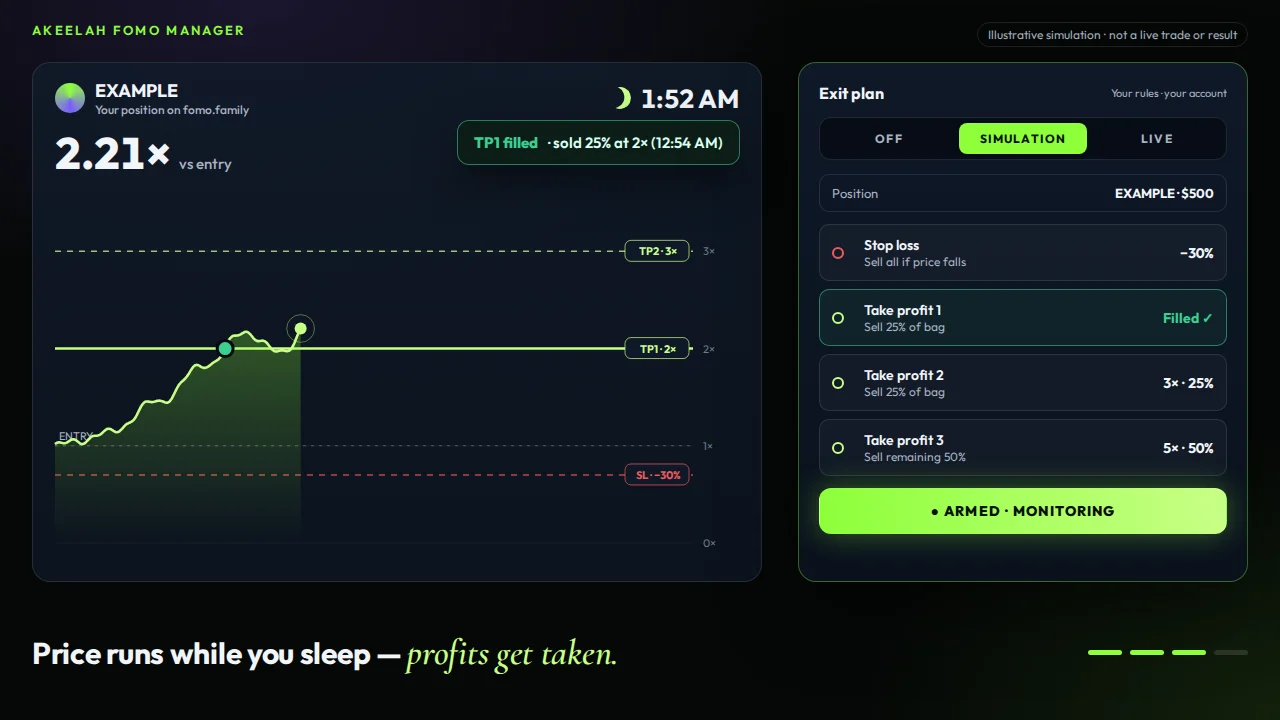
FOMO Manager interface illustration showing take profit 1 filled while monitoring overnight

Example B · same token · same night

Unmanaged vs. managed.

Trader without an exit plan−65%Rode it to 3× and all the way back down.
Managed: stop + 3-target ladder+60%25% sold at 2×, 25% at 3×, the rest stopped near 0.7×.

Illustrative simulation of a hypothetical price path, shown to explain how exit rules work. Not a real trade, not typical results, not a prediction.

Tools for your exit plan

Everything FOMO should have had.

Protection that's armed the moment you enter.

Set a stop-loss and take-profit as part of the trade, not as something you hope to remember at 2 AM. Market and limit buys and sells are built in.

  • Stop-loss by % below entry
  • Take-profit by multiple or price
  • Buy & sell limits
  • Market buy & sell

Included in Essential, Pro and Elite

Exit planInterface illustration
OFFSIMULATIONLIVE
PositionEXAMPLE · $500
Stop lossSell all if price falls
−30%
Take profitSell 100% at target
3×
ARM EXIT PLAN

Plan before you step away

Build an exit plan in ten seconds.

Change the numbers and see the illustrative result of each rule. This is the plan the FOMO Manager enforces for you.

Target (×)Sell % remaining

Each sell percentage applies to the remaining tokens at that target. A $500 position held in full is worth $1,000 at 2× or $1,500 at 3×. Sale payout includes original cost; net profit subtracts the cost of the tokens sold. Simple arithmetic for illustration. Ignores fees, slippage and price impact; stops can fill below their level in fast markets.

Choose your level of support

Less screen time.
A plan that fits your trading.

Plans for FOMO.family traders. Each tier includes everything below it. Cancel anytime before renewal.

Fresh Sapien, a trader learning to manage exitsFresh Sapien

Essential

"I’m getting wrecked on too many trades. I needed a stop-loss yesterday."

$99/month

Try it free for 7 days. Cancel anytime before day 7 and you pay nothing.

  • Market buy & sell
  • Buy & sell limits
  • Stop-loss
  • Take-profit
  • Multiple / laddered take-profit
  • Telegram & Windows alerts
  • Simulation mode
Start 7-day free trial
Most popular
Illustrated Whale Sapien in a pinstripe suit and chart sunglassesWhale Sapien

Pro

"I’m holding bags worth protecting. I need my stops to follow the pump."

$199/month

Try it free for 7 days. Cancel anytime before day 7 and you pay nothing.

  • Everything in Essential
  • Standalone trailing stops
  • Automatic trailing profit
  • Bag cleanup & P&L cleanup
  • Token swap
Start 7-day free trial
Illustrated Launch Patrol trader with headset at a signal deskLaunch Patrol

Elite

"I’m hunting signals 24/7. I’ve got a lot going on. About $10 a day to help me manage this chaos? Absolutely."

$299/month

Try it free for 7 days. Cancel anytime before day 7 and you pay nothing.

  • Everything in Pro
  • Telegram signal trading
  • Approved channel selection
  • Signal filters
  • Automatic signal execution
  • Scheduled / overnight automation
Start 7-day free trial

What you need before you subscribe

  • Desktop Google Chrome. This is an unpacked Chrome extension, not a mobile app.
  • Your own signed-in FOMO account. Your license binds to that account.
  • A computer left on and awake. Keep Chrome, a FOMO tab and your internet connection running for overnight monitoring.

Browser closed, computer asleep or FOMO signed out? Your local instructions can't execute. Stops can fill below their threshold in fast markets.

Try it free for 7 days. Cancel anytime before day 7 and you pay nothing. Card required. After the trial, subscriptions renew monthly until canceled before renewal. Uninstalling does not cancel billing. Read software sales terms

Built by a trader who wanted his time back

I built this because I was tired of losing sleep.

I trade FOMO myself. I got tired of buying at night, waking up to find the run had come and gone, and having no way to set a simple stop or take-profit. So I built the tool I wanted, and I run it on my own trades every day.

It won't pick winners for you, and nothing can promise profit. It watches the rules you set with a clear head and attempts the trades when those rules trigger.

AkeelahFounder, Akeelah Trading Academy

A real trade. An exit plan that kept working.

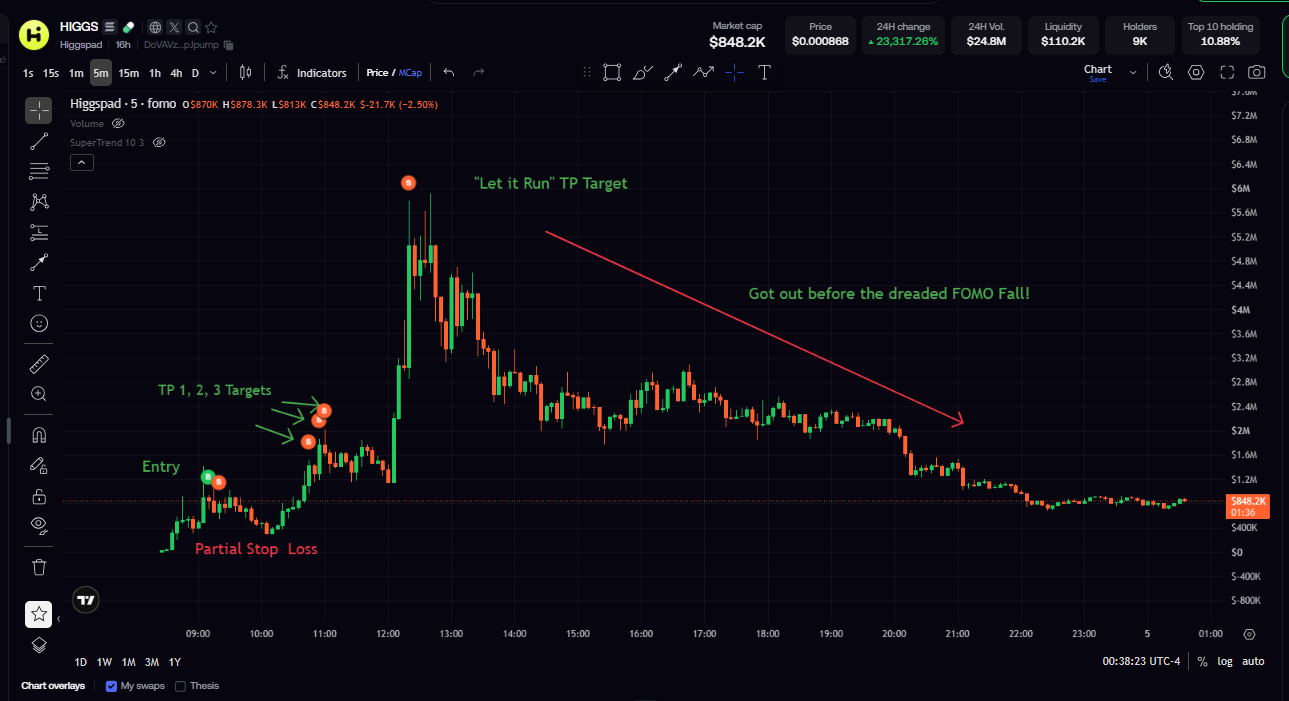
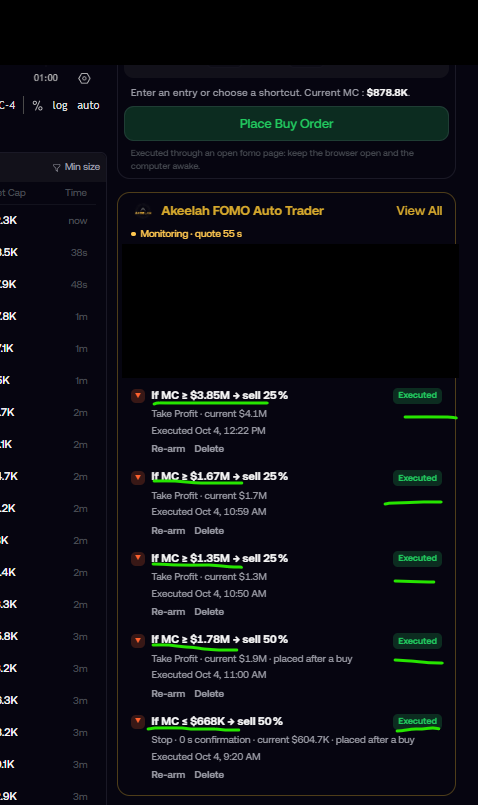
The chart shows where the exits happened; the order history shows what executed. These are actual screenshots from my account, not the illustrative demo.

Actual HIGGS trade chart annotated with entry, partial stop-loss, three take-profit exits and a later target
Actual HIGGS trade: entry, partial stop-loss, TP1–TP3 and a later target. The founder reports these exits ran while away.
Actual executed-orders panel showing five completed stop-loss and take-profit orders
The matching order history: five executed exits on October 4, 2026. Account identity hidden.
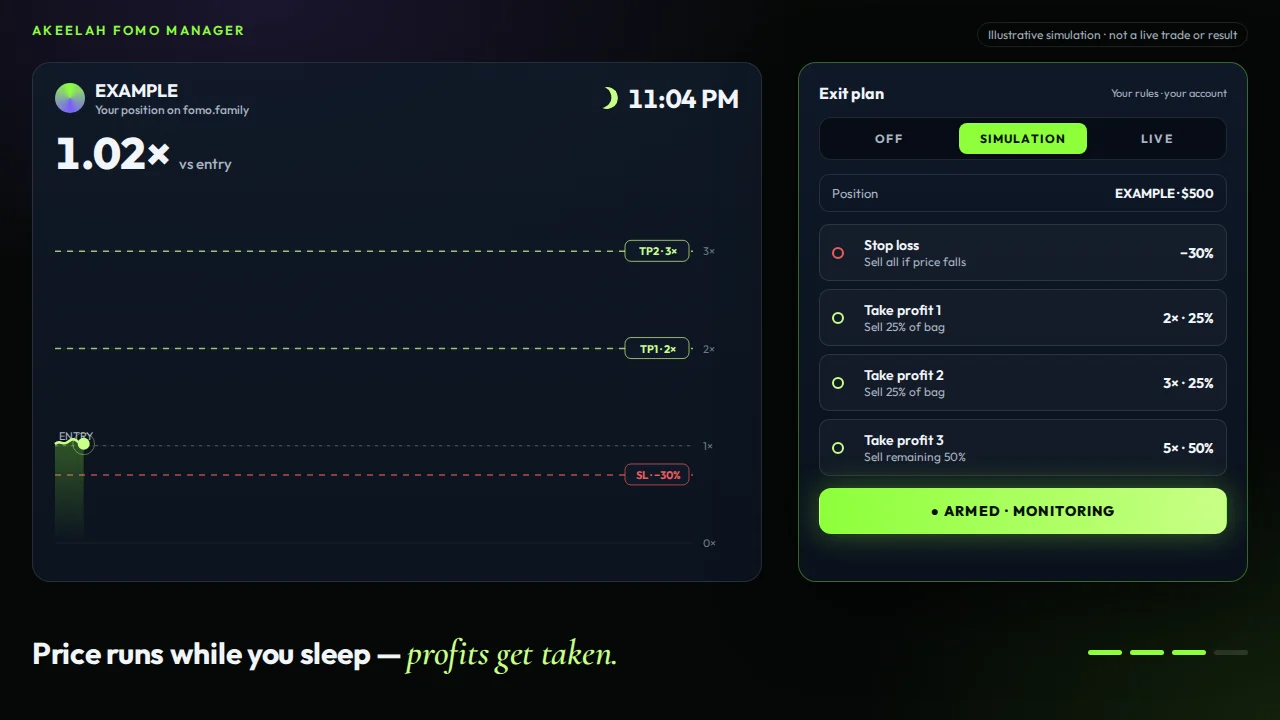
Interface illustration of an armed exit plan
Interface illustration

From the trading desk

Less chart watching.
More sticking to the plan.

Firsthand feedback from actual FOMO traders using the Manager.

Trader feedback, edited for clarity. Names withheld for privacy. Individual results vary; execution and trading outcomes are not guaranteed.

Start your 7-day free trial, then from $99/month

Questions traders actually ask.

Is there a free trial?

Try it free for 7 days. Cancel anytime before day 7 and you pay nothing.

Is this made for the FOMO app (fomo.family)?

Yes, specifically. The FOMO Manager is built only for FOMO. It runs on the FOMO web app at fomo.family in desktop Chrome, using your own signed-in FOMO account. Because your phone and the web app share the same FOMO account, a position you open on your phone shows up on your desktop too. Set its exit plan there and the extension manages it. It doesn't work with other exchanges or apps.

Does the FOMO Manager hold my money or have access to my funds?

No. It runs as an extension in your own Chrome browser, on your own signed-in FOMO account. Nothing is pooled, nothing is held, and nobody trades for you. It executes the rules you set.

Is this an auto-trading bot?

FOMO Manager protects your exits. On Elite, it can also execute signals from a Telegram channel you select; Akeelah does not send or recommend signals.

Is this a phone app?

No. The FOMO Manager is a desktop Chrome extension. You can still buy on the FOMO app on your phone, but exit plans are set on your desktop: open fomo.family in Chrome and set the plan on that position. The manager runs on your computer and sends alerts to your phone through Telegram.

How do the alerts work?

Enable alerts and link your Telegram to receive messages for trade triggers, completed buys and sells, and execution problems. Windows notifications are available on the computer running the manager.

What happens if my computer goes to sleep?

Your rules are monitored locally, so if the computer sleeps, Chrome closes or FOMO signs out, they can't execute. Set your computer to stay awake overnight. Most traders run it on a desktop or a plugged-in laptop.

Will my stop-loss always sell at exactly my price?

Not always. In fast or thin markets a stop can fill below its level. Execution, price and fills are never guaranteed. That's true of any stop on any platform.

Can I test it before risking real money?

Yes. Simulation mode runs your full plan (monitoring and triggers) but skips the final trade click. Run it in Simulation, then switch to LIVE when you’re ready.

Which plan should I pick?

Essential if you want stop-losses, take-profits and limits. Pro if you also want trailing stops, automatic trailing profit, bag cleanup and swaps. Elite if you trade Telegram signals and want approved-channel automation and scheduled overnight runs.

Can I cancel?

Try it free for 7 days. Cancel anytime before day 7 and you pay nothing. After the trial, cancel before your next renewal from the billing portal. Uninstalling does not cancel billing.

How do I install it after I buy?

After checkout you'll activate your license and get the extension, an installation guide and an illustrated manual from the customer downloads page.

Your life is bigger than the next candle.
Get your life back.

Dinner. Family time. A full night’s sleep. Set your exit plan and make room for more than trading. Start your 7-day free trial, then from $99/month.

Try it free for 7 days. Cancel anytime before day 7 and you pay nothing.

The Akeelah FOMO Manager is an execution and trade-management tool. It does not guarantee profitable trades, eliminate market risk or replace your responsibility for the strategy, settings and positions being traded. Requires Google Chrome, an authenticated FOMO session and a licensed FOMO account. Telegram features require the approved channel open in Telegram Web. Keep Chrome open, the computer awake and FOMO signed in; orders are monitored locally. Changing Telegram channels or scrolling older history can create new signal candidates, and some contract addresses may be missed. Keep automatic entries off while navigating and verify signals in simulation before LIVE. Character artwork, interface mockups and the unmanaged-versus-managed example are illustrations of hypothetical scenarios. The founder walkthrough and labeled actual-trade screenshots are real recordings from the founder’s account; historical results are not typical results or a promise of future performance. Not affiliated with, endorsed by or sponsored by FOMO (fomo.family); "FOMO" is a trademark of its respective owner and is used here only to describe compatibility.